When I try to mesh my model, I reseave an mesh error that says: “Couldn’t mesh: not enough space in octtree -2-”.
What does this mean?
When I ask to signal it in my model, GiD just indicates a random point in a volume.
What can I do/check? please help me.
Hello,
it may be caused by a too small mesh size.
If you have no problems with confidentiallity, could you please send me the model, so I can check what is happening?
Hello
If the problem indeed has to do with the mesh size, than what mesh properties do you suggest to get the best results?
In the model (that I attached) will be added a lot of reinforcement (just so you know).
Wanhoop 4.gid.zip (474 KB)
Hello,
it seems that your model has some wrong defined geometrical entities. If you set Utilities->Repair model, you will see that GiD is fixing some of the warnings, but the volume number 5 is not closed topologically.
If you fix this, the meshing process should be fine.
Kind regards,
Hello
I know that the problem is concerning the error message 5.
The other problems were not in my model but somehow it got changed (maybe it didn’t save my last version).
I assigned the interfaces to the right material and still get error message 5.
Are you saying you have no idea what this error is about?
When, after assigning the right material to the interfaces, I repaired the model like you suggested me to.
Then when I try to mesh the model it says “meshing error information not available”.
What can I do?
Kind regards
Rob
Wanhoop 4.gid.zip (232 KB)
Hello
Can you help me?
I don’t want to rush you of course but I have a deadline coming up.
Kind regards
Rob
Hi Rob,
Your model has (already not fixed) the problem related by Abel: the volume 5 is wrongly defined (I don’t know how, if you are able to repeat it let me know the commands used) and it is like a surface is missing to be closed. Trying to create the volume again with its surfaces you can see that is not closing at four lines, and there is a surface 852 with just these lines. Then the first step is to delete and create again the volume with the right surfaces. (a repair cannot fix this bug)
Then I have tried to mesh with differente sizes and it has problems to generate the mesh. Do you have volumes with some small surfaces close to bigger surfaces, a tetrahedron must have ‘similar’ edge sizes, in general you must assign sizes if necessary to some lines and/or surfaces to reach it.
In any case do you have a lot (308) of contact volumes, joining ‘equivalent surfaces’ of two volume parts in contact. It is difficult to check all of them, and its orientations.
I have deleted all your contact volumes, and re-created all of them automatically. This tool doesn’t exists in GiD 13.0 official versions, like your 13.0.4, this feature has been implemented in latest GiD 13.1.xd developer versions (soon GiD 14.0 official)
menu: Geometry->Create->Contact->Automatic volumes
and selected all surfaces (to find pairs between them). It has created 402 contact volumes (your model has 308)
Then I am able to mesh without problems.
I attach my fixed model
Wanhoop 4-create-again-volume-5-adding-surface-852-rebuild-contact-volumes.zip (242 KB)
Note: I have assigned again the material to the rebuilt volume and contact volumes.
Hello
Thank you for the respons.
I deleted the volume and recreated it, this worked (I think).
You say I have to assigne mesh sizes to some small lines or surfaces, how do I know which lines or surfaces and how big the sizes should be?
Also, do I do this with: mesh > structured…?
It’s a shame indeed, that that function is not available for me yet.
Is it a real problem though if I missed these contact volumes?
If I want to mesh now, the program fails and tels me there is no information available.
The file you send (that is made in a newer version) can not be opened by me (in version GiD 13.0.4) for some reason.
Kind regards
Rob
Wanhoop 4.gid.zip (234 KB)
I am able to open an re-mesh my previous model with GiD 13.0.4 Win x64 also (off course must be unzipped before)
Maybe the problem is related with the version of the Atena problemtype?
(ATENA->About problemtype version show "Build 15727 & ATENA 5.6.0)
And about the new feature only available in 13.1.xd developer versions, you can download and install these versions (your password 13.0.x is valid for all 13.1.xd developer versions), about the problemtype you must simply copy it, or a direct access, to your ATENA problemtype.
In any case I attach again my fixed model, now read and re-saved with GiD 13.0.4
Wanhoop 4 saved by GiD 13_0_4.zip (241 KB)
Hello
Thanks for the help.
The meshing works perfect now.
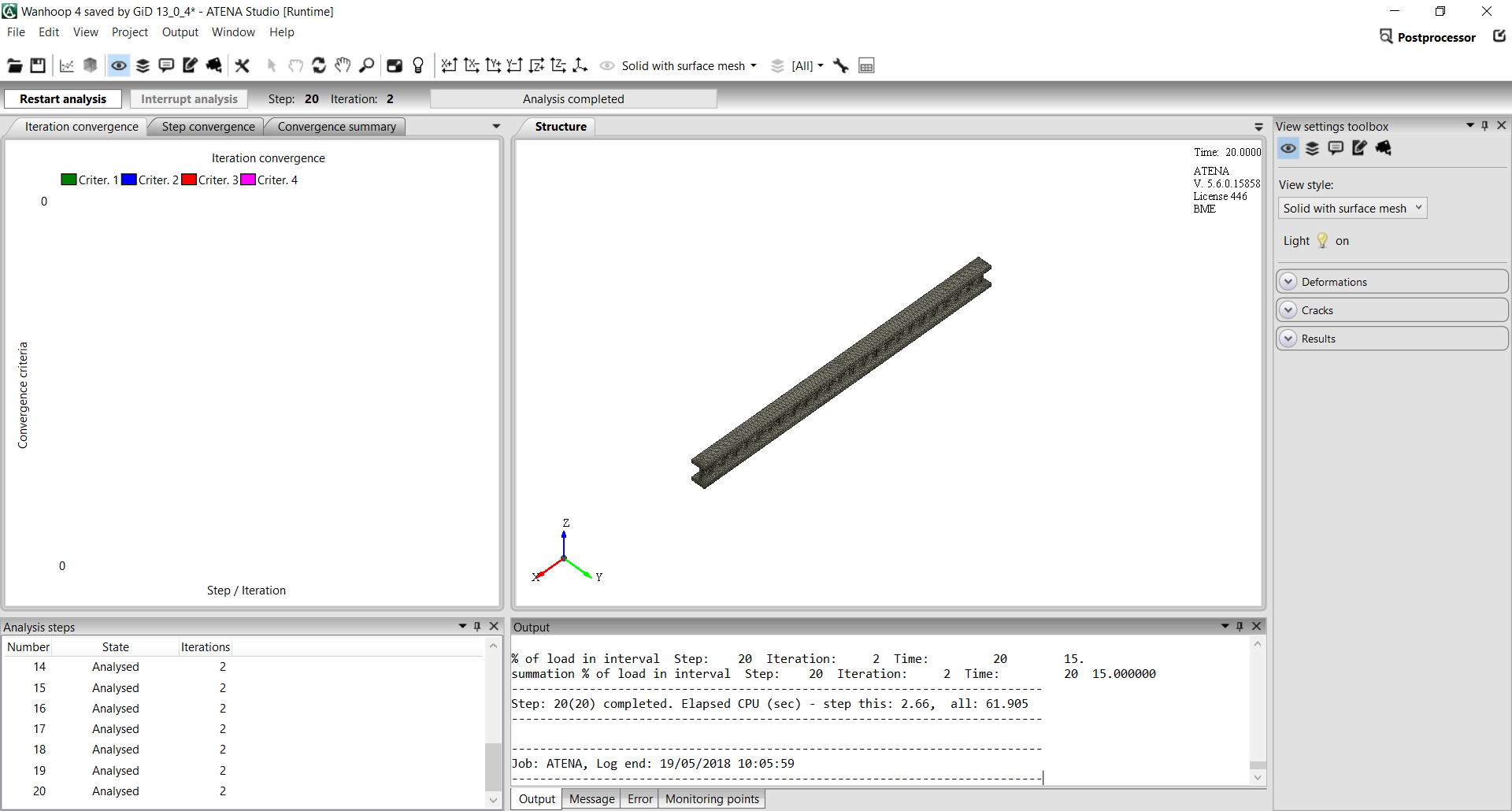
For some reason when running the model in Atena, I don’t get any information or anything in the iteration convergence (see attachment).
Do you know what I can do about this?
Kind regards
Rob
Sorry, I can’t aid you in this question. Must ask it to the Atena developers.
(I never used Atena, and in fact I don’t have any copy of this calculation program)